

A scenario comparison is useful when it helps a team understand why one option is preferable under particular conditions. It is less useful when each option uses different assumptions or when a single score hides the trade-offs. Build the comparison around the decision, then keep the arithmetic and judgment visible.
Give every option the same starting point.
Define the current state, the period, the units and the population being compared. Include a do-minimum option so the team can see the cost and risk of continuing. If demand or policy will change regardless of the project, reflect that consistently across the options.
Distinguish measured baselines from estimates. Record who supplied each important input and its source. A cycle-time measure, a loaded hourly rate and an adoption assumption have different evidence needs. Use a range where uncertainty is meaningful, and leave an input unknown when there is no defensible basis.
Make the options meaningfully different.
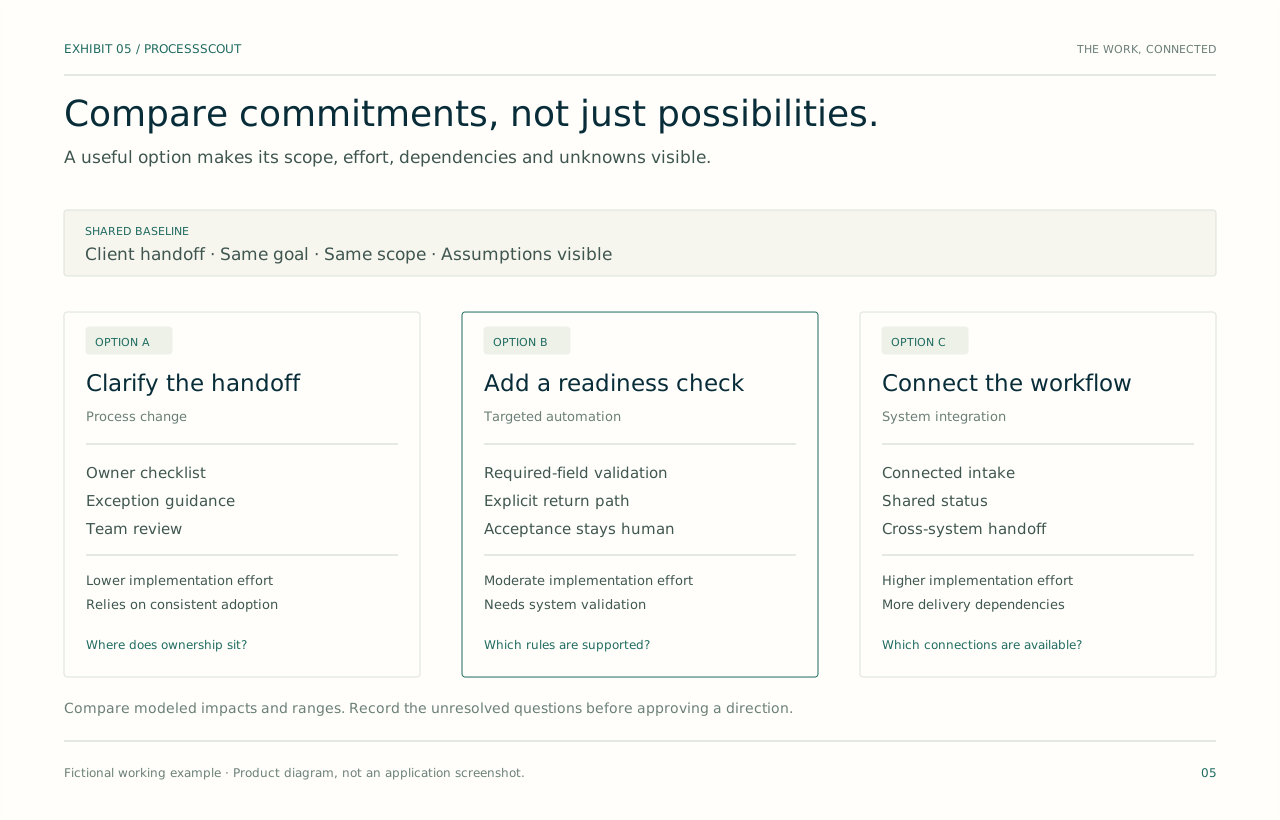
Compare approaches that address the same problem through different mechanisms. For a handoff issue, the options might be a clearer checklist, a workflow change or a system integration. Describe what each option changes, who must participate and which problem it leaves unresolved.
Include implementation effort, ongoing operating cost, dependencies and reversibility. A lower-cost option may take longer to adopt; a more comprehensive option may rely on another system team. Put those constraints beside the forecast so they influence the choice before approval.
Test the assumptions that could change the ranking.
Vary the inputs that matter most, such as annual volume, adoption, time released per case and ongoing cost. Show the effect on the same outputs for every option. Avoid changing only the preferred option’s assumptions or presenting a favorable case as though it were the expected outcome.
Ask where the recommendation changes. If a workflow improvement becomes worthwhile only at very high adoption, the adoption plan is part of the business case. If two options remain close across plausible assumptions, risk, speed and reversibility may be more useful differentiators than another decimal place.
Record the decision and its conditions.
State the selected option, the alternatives considered, the reasons for the choice and the assumptions that require validation. Name the approver and the scope they approved. Attach the first measurements and the conditions that would trigger a review, pause or change in approach.
Carry those conditions into delivery. A decision record that disappears after approval cannot guide implementation. When scope or assumptions change, update the record visibly and determine whether renewed approval is needed. The aim is a decision people can work with, not a model that nobody revisits.

Fictional working example
Adoption matters more than the headline forecast
Northstar compares a shared checklist with a queue integration. The integration releases more time per adopted case but requires greater upfront work. At modest adoption, the checklist offers the better first step. The team chooses it for a limited rollout and agrees to revisit integration after measuring use and return rates. The comparison makes the next learning step explicit.
- Shared basis
- Same volume, rate and evaluation period
- Variable
- Adoption of the new process
- Decision condition
- Review after the first measured rollout
Bring this to the review
A practical checklist.
- The options use a common baseline and period.
- The do-minimum path is visible.
- Inputs separate measurements from assumptions.
- Sensitivity checks include adoption and ongoing cost.
- The decision names an approver and review conditions.
In ProcessScout
ProcessScout connects scenario comparison to evidence, design and delivery. In the interactive demo, change volume and adoption to see a fictional forecast respond. Treat the results as an explanation of the assumptions, then use your own reviewed evidence for a real investment decision.